Object-Oriented Programming in JavaScript
A beginner-friendly introduction to Object-Oriented Programming (OOP) in JavaScript, explaining classes, objects, constructors, and methods using simple real-life examples.

Introduction: Why Do We Need Object-Oriented Programming?
When applications grow bigger, managing code becomes difficult if everything is written in a single place. Developers need a way to organize code logically and reuse it easily.
This is where Object-Oriented Programming (OOP) comes in.
Object-Oriented Programming is a programming style that organizes code around objects and classes. Instead of writing separate pieces of code repeatedly, we create structures that represent real-world entities.
For example:
A Car
A Student
A Person
Each of these can have properties (data) and behaviors (actions).
What does Object Oriented Programming mean?
Object-Oriented Programming is a way of writing programs where we model real-world things as objects.
Each object contains:
Properties → data about the object
Methods → actions the object can perform
Example: A Car object
| Property | Example |
|---|---|
| brand | Toyota |
| color | Red |
| speed | 120 |
| Method | Example |
|---|---|
| start() | starts the car |
| stop() | stops the car |
This approach makes programs more organized, reusable, and easier to maintain.
Real Life Analogy : Blueprint -> Object
To understand OOP better, imagine building a car.
Before building a car, engineers create a blueprint (design). Using that blueprint, many cars can be produced.
Similarly in programming:
Class → Blueprint
Object → Actual product
Blueprint to Object Diagram
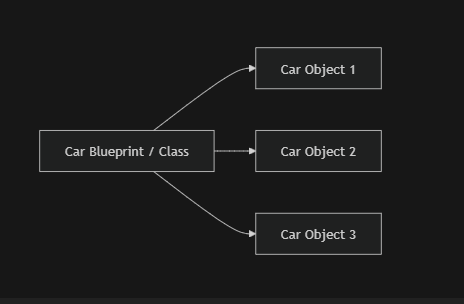
One blueprint can create many objects.
What is a Class in JavaScript?
A class is like a template used to create objects.
Classes define:
What properties will an object have
What methods the object can perform
Example:
class Car {
  constructor(brand, color) {
    this.brand = brand;
    this.color = color;
  }
}
Here:
Caris the classIt defines what a car object should contain.
Creating Object Using Class
Objects are created using the new keyword.
Example:
class Car {
  constructor(brand, color) {
    this.brand = brand;
    this.color = color;
  }
}

const car1 = new Car("Toyota", "Red");
const car2 = new Car("Honda", "Black");

console.log(car1.brand);
Output:
Toyota
Here:
car1andcar2are objects (instances) of the class.
Class -> Instance Relationship
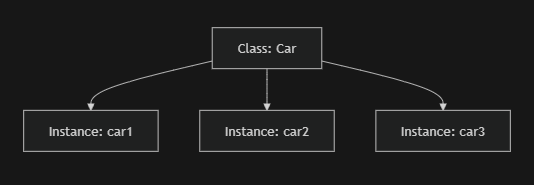
A class can create multiple objects with different data.
Constructor Method
The constructor is a special method used to initialize object properties.
It runs automatically when a new object is created.
Example:
class Person {
  constructor(name, age) {
    this.name = name;
    this.age = age;
  }
}

const person1 = new Person("Alice", 25);
Here:
constructorsets initial values for the object.
Real-life analogy:
Think of the constructor like filling a form when creating a new ID card.
Methods Inside a Class
Methods are functions defined inside a class that describe actions.
Example:
class Person {
  constructor(name, age) {
    this.name = name;
    this.age = age;
  }

  greet() {
    console.log("Hello, my name is " + this.name);
  }
}

const person1 = new Person("Alice", 25);
person1.greet();
Output:
Hello, my name is Alice
Methods allow objects to perform actions.
Basics Of Encapsulation
Encapsulation means grouping data and functions together inside a class.
In simple terms:
Data + behavior = one unit
Example:
class BankAccount {
  constructor(balance) {
    this.balance = balance;
  }

  deposit(amount) {
    this.balance += amount;
  }
}
Here:
Balance data
Deposit function
are both inside the same class.
This keeps the code organized and secure.
Why OOP is Useful?
Object-Oriented Programming provides many benefits:
Code Reusability – one class can create many objects
Better Organization – related code stays together
Easier Maintenance – changes are easier to manage
OOP is widely used in modern JavaScript applications and frameworks.
Assignment Practice
Step 1: Create a Student Class
class Student {
  constructor(name, age) {
    this.name = name;
    this.age = age;
  }

  showDetails() {
    console.log("Name: " + this.name + ", Age: " + this.age);
  }
}
Step 2 : Creating Multiple Options
const student1 = new Student("Riya", 20);
const student2 = new Student("Arjun", 22);

student1.showDetails();
student2.showDetails();
Output:
Name: Riya, Age: 20
Name: Arjun, Age: 22
Here we created multiple student objects from one class.
Object-Oriented Programming helps developers structure programs in a logical and reusable way.
By understanding OOP, developers can write cleaner, scalable, and more maintainable code.


